
Using domain events with rabbitmq
In this post, we'll explain how to use a DomainEvents class to orchestrate event publishing and consumption using RabbitMQ. This setup is ideal for a microservices architecture within a monorepo.
Setting Up Dependencies
First, install the necessary dependencies for our new monorepo package message-broker:
pnpm install amqplib
pnpm install @types/amqplib --save-dev
RabbitMQ Connection Class
Create a RabbitMQ class to manage connections and channels:
import amqp, { Channel, Connection, ConsumeMessage } from 'amqplib';
import { env } from "env";

class RabbitMQ {
  private connection: Connection | null = null;
  private channel: Channel | null = null;

  async connect(): Promise<void> {
    this.connection = await amqp.connect(env.MQ_URL);
    this.channel = await this.connection.createChannel();
  }

  async createQueue(queue: string): Promise<void> {
    if (!this.channel) throw new Error("Channel is not initialized");
    await this.channel.assertQueue(queue, { durable: true });
  }

  async sendToQueue(queue: string, message: string): Promise<void> {
    if (!this.channel) throw new Error("Channel is not initialized");
    this.channel.sendToQueue(queue, Buffer.from(message));
  }

  async consumeQueue(queue: string, callback: (msg: ConsumeMessage | null) => void): Promise<void> {
    if (!this.channel) throw new Error("Channel is not initialized");
    await this.channel.consume(queue, callback, { noAck: true });
  }

  async close(): Promise<void> {
    if (this.channel) await this.channel.close();
    if (this.connection) await this.connection.close();
  }
}

export const rabbitMQ = new RabbitMQ();
DomainEvents Class
Implement the DomainEvents class for event orchestration:
import { rabbitMQ } from './rabbitmq'

type EventHandler = (data: unknown) => void

class DomainEvents {
  private static handlers: Record<string, EventHandler[]> = {}

  static async publish<T>(event: string, data: T): Promise<void> {
    const message = JSON.stringify({ event, data })
    await rabbitMQ.sendToQueue(event, message)
  }

  static subscribe(event: string, handler: EventHandler): void {
    if (!this.handlers[event]) {
      this.handlers[event] = []
    }
    this.handlers[event].push(handler)
  }

  static async listen(event: string): Promise<void> {
    await rabbitMQ.createQueue(event)
    await rabbitMQ.consumeQueue(event, (msg) => {
      if (msg) {
        const messageContent = msg.content.toString()
        const { data } = JSON.parse(messageContent)
        this.handlers[event].forEach((handler) => handler(data))
      }
    })
  }
}

export { DomainEvents }
Using DomainEvents in Microservices
Publishing user.created on user-service
To publish an event, use the publish method, like here on the register-user-controller.ts, on user-service
await DomainEvents.publish<UserPublic>(
  'user.created',
  UserPresenter.toHTTP(user),
)
Subscribing to an Event
To subscribe to an event, use the subscribe method, like here on the subscribe.ts , on hotel-service
import { DomainEvents, rabbitMQ } from 'message-broker';
import { createUser } from './events/user-created';
import { updateUser } from './events/user-updated';

export const subscribe = async () => {
  await rabbitMQ.connect()
  await DomainEvents.listen('user.created');
  await DomainEvents.listen('user.updated');

  DomainEvents.subscribe('user.created', async (data) => {
    await createUser(data)
  });

  DomainEvents.subscribe('user.updated', async (data) => {
    await updateUser(data)
  });
}
Starting the Application
Make sure to call subscribe() at the server start:
app.listen({ port: env.HOTEL_SERVICE_PORT }).then(async () => {
  subscribe().catch(console.error)

  console.log('')
  console.log('🤘 MS Hotel Service running!')
})
Here we can see all together in action:
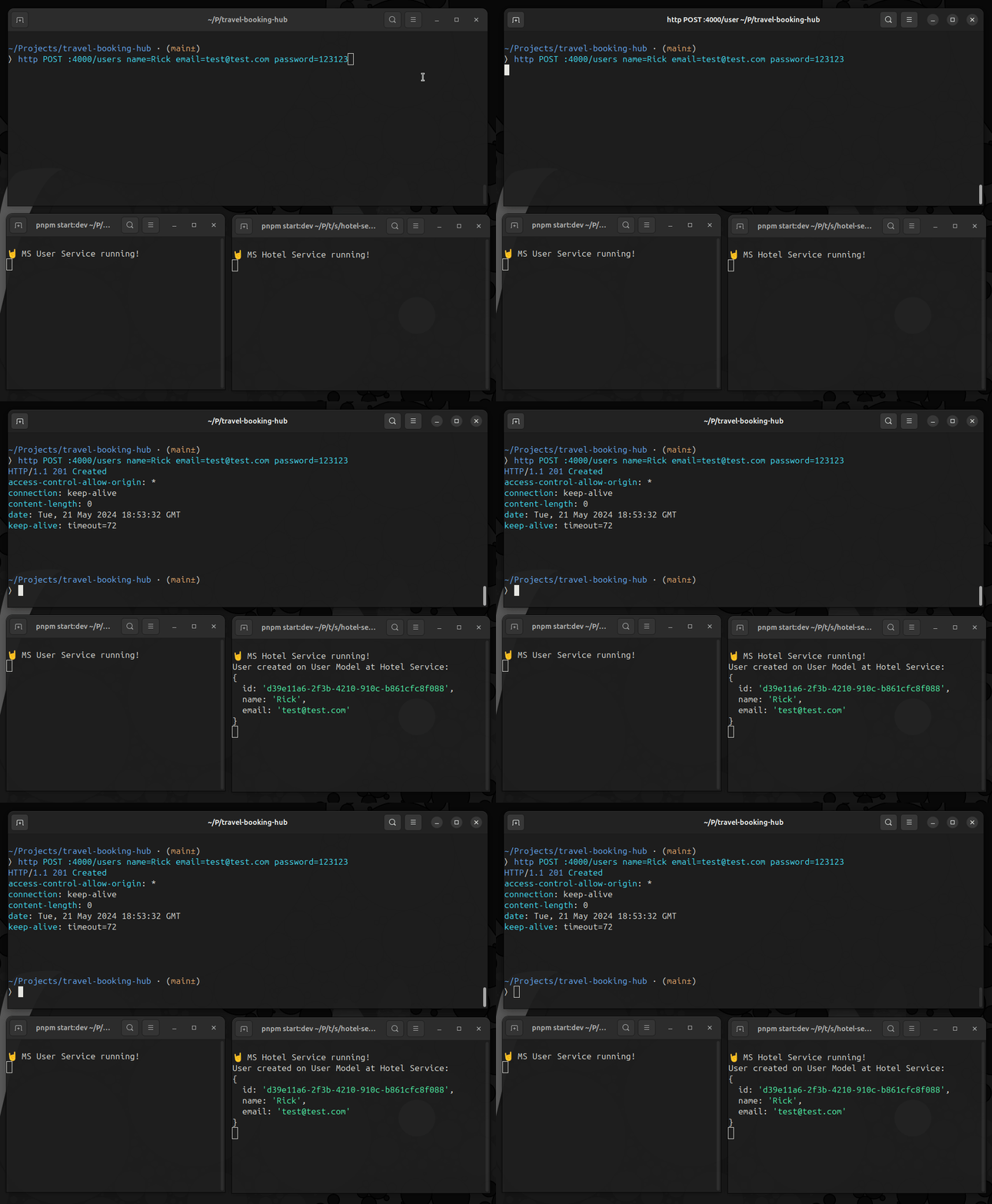
By following these steps, you can effectively manage event-driven communication between microservices using RabbitMQ in a Node.js monorepo. This approach ensures a scalable and maintainable architecture for your application.
Contribute to the Project
If you found this post helpful or have suggestions for improvement, feel free to check out the project repository on GitHub. You are welcome to fork the repository and submit a pull request. If you have any questions or want to discuss a topic, please open an issue. We appreciate your contributions!